Fine-Tuning and PEFT
- #AI
- #Fine-tuning
- #PEFT
- #LoRA
- #QLoRA
Starting a project with AI these days usually means picking up a model that’s already been trained — something like GPT or Llama — and building from there. Training a model from scratch demands resources most people don’t have. But a general-purpose model out of the box doesn’t always cut it. The tone might not fit the service you’re building, the output format could be off, or the model might simply know nothing about the domain you care about. So how do you bend a model that’s already been trained toward your own service?
Methods vary, but in this post I’ll cover fine-tuning — taking a pretrained model and training it further on a specific task or domain — and in particular PEFT (Parameter-Efficient Fine-Tuning), which dramatically cuts the memory overhead.
What Is Fine-Tuning?
An AI model is made up of several large numeric matrices. Each number is a weight, and that’s where the model’s “knowledge” lives. Fine-tuning means taking a pretrained model and training those weights a little further toward your own goal. Because you’re actually touching the weights, fine-tuning changes the model’s behavior — its tone, output format, and how it approaches specific tasks.
- Pretraining — the stage where a blank-slate model learns the general patterns of language from internet-scale text. The original GPT, Llama, Qwen models all come from here. It takes thousands of GPUs and enormous cost, so it’s not something you’d typically do yourself.
- Fine-tuning — taking the original model from pretraining and adjusting the weights further, with a much smaller dataset, toward a specific task, domain, or tone.
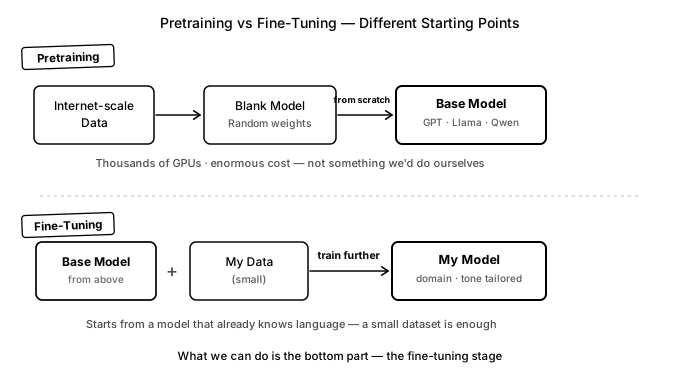
Fortunately, the original model already knows most of language, so even a small dataset can pull the model in the direction you want.
Types of Fine-Tuning
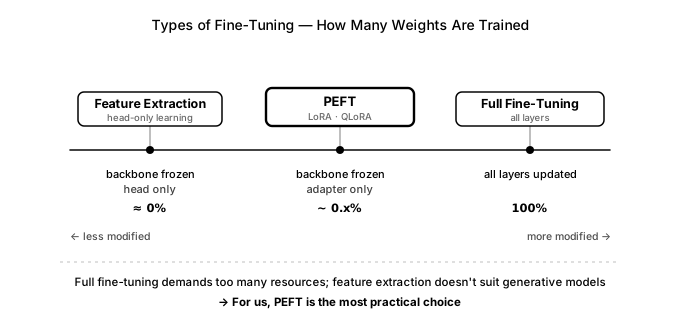
When adapting a model, the methods split by how much of the weights you actually train — from barely touching them to updating everything.
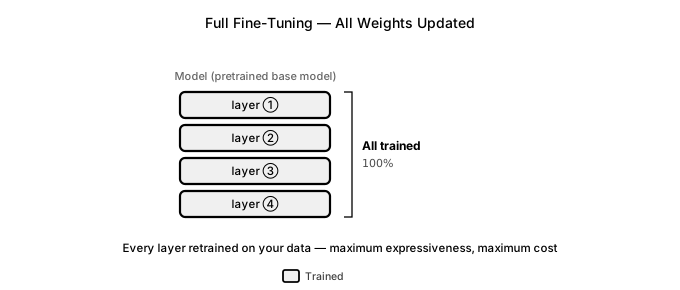
Full fine-tuning — the most intuitive approach: update every weight in the model. Every layer, from the backbone to the output, is retrained on your data. It’s the most expressive option, but the memory and storage costs are proportionally high, making it impractical without substantial resources.
Feature extraction — the opposite approach: freeze the entire pretrained model and attach a single new output layer (head) on top, training only that. The heavy backbone stays fixed; you just swap in a lightweight head.
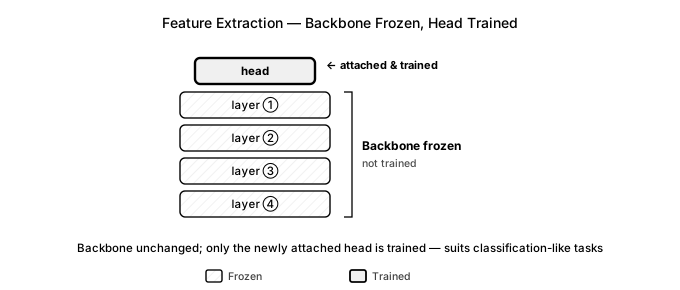
The backbone acts as a fixed feature extractor that converts inputs into meaning-laden numeric vectors, and the head converts those vectors into the answer you want (e.g., positive/negative sentiment). Only the head learns, so it’s cheap and fast — but since you’re not touching the backbone, it falls short when the backbone is too far removed from your domain.
Strictly speaking, feature extraction never touches the pretrained weights at all, so calling it fine-tuning in the sense of adjusting weights is a stretch. (In fact, both feature extraction and fine-tuning are varieties of transfer learning — applying knowledge built up during pretraining to a new task.) Feature extraction also fits tasks that attach a new head, like classification, so it’s a bit orthogonal to the generative models we’re focused on here.
PEFT (Parameter-Efficient Fine-Tuning) — a middle ground that’s become the standard approach today. Like feature extraction, most of the backbone is frozen; but rather than attaching a new output layer, you insert very small parameters (adapters) inside the model itself. This gives you the model-internal changes of full fine-tuning while training less than 1% of the total parameters in many cases.
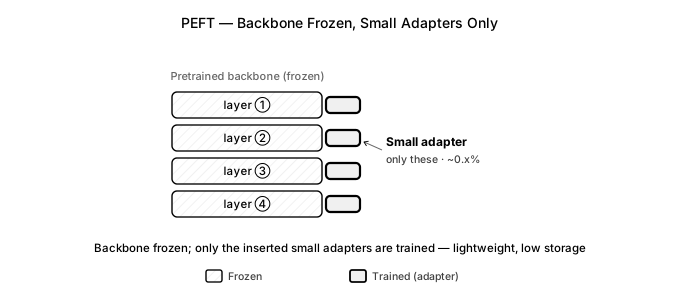
Placing all three on a single axis by “how many weights you train” gives a continuum with multiple points along it.
PEFT
As mentioned, full fine-tuning is resource-heavy. Let me first pin down exactly what resources it demands and how much, then look at how PEFT addresses that.
Why Full Fine-Tuning Is Expensive
Parameter is just another word for weight — the numbers inside a model that are learned during training. The “7B” or “8B” numbers you see in model names are exactly those weight counts. Qwen2.5 7B has around 7 billion; Llama 3 8B has around 8 billion; larger ones like Llama 3 70B have 70 billion. And fine-tuning is ultimately about changing those weights.
The problem is that while you’re computing how to change each weight, there’s temporary data attached to every weight that takes up a lot of memory.
- Gradient — a value telling each weight which direction to move. One per weight.
- Optimizer state — auxiliary values that smooth out those moves. Adam carries two per weight.
These aren’t parameters themselves; they’re working data created temporarily to fix the parameters. They’re discarded once training is done and don’t appear in the finished model, but they occupy space during training.
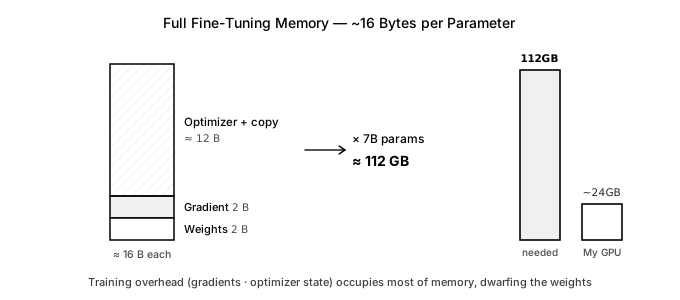
So with 7 billion weights, you also get 7 billion gradients and 14 billion optimizer state values. Add in a high-precision master copy of the weights for stable computation, and you’re looking at roughly 16 bytes per parameter — even though the weight itself is only 2 of those bytes; the rest is all training overhead.
params = 7_000_000_000     # 7 billion weights (parameters)
bytes_per_param = 16       # weight + gradient + optimizer state etc., ~16 bytes each

gb = params * bytes_per_param / 1e9
print(gb)                  # 112.0
Just running a model needs only the weights, so a 7B model takes about 14 GB; training it, with all the attached data, takes about 112 GB — eight times more. (This counts only the per-weight overhead, not the intermediate activations from processing long inputs.) Consumer GPUs typically max out at 16–24 GB per card, which falls well short.
The PEFT Idea — Train Only a Small Component
The PEFT idea is simple: freeze the heavy backbone (no learning there), and train only the small component you insert. The trainable parameters are less than 1% of the total, so the gradients and optimizer data attached to them shrink proportionally.
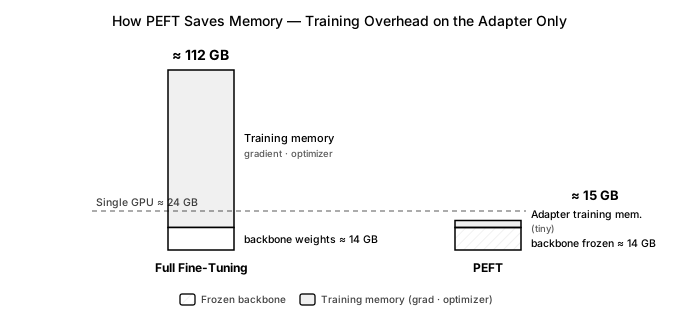
The small component you insert is called an adapter. Think of it as leaving the thick book alone and just sticking a Post-it note in the relevant spot — the original knowledge stays untouched; you create only a small addition. And the currently dominant method for building these adapters is LoRA (Low-Rank Adaptation).
LoRA — Two Small Matrices Instead of One Big One
In LoRA, the adapter is a separate set of weights added on top of the original matrix. There are far fewer of them — less than 1% of the original — and at inference time the model produces output from “original weights + the trained adapter.” But how can adding so few weights shift the model in the direction you want?
A model’s weights are enormous matrices — grids of numbers arranged in rows and columns. A typical weight matrix is 4096×4096, which has about 16.77 million cells. Full fine-tuning has to relearn this entire matrix, which means learning the full quantity of changes from scratch.
LoRA doesn’t retrain the original matrix. It freezes it and attaches only an adapter made of two much smaller matrices.
The multiplication table is a good intuition. The 3×3 matrix below has 9 cells, but you only need the column [1, 2, 3] and the row [10, 20, 30] to fill them all — each cell is just “column value × row value.” Instead of storing all 9 numbers, 3 column values + 3 row values, just 6 numbers, is enough.
          10   20   30     ← row
   1  │   10   20   30
   2  │   20   40   60
   3  │   30   60   90
   ↑
   column
This effect scales up dramatically with larger matrices. Even a 4096×4096 matrix (≈16.77 million cells) can be produced from a single column vector and a single row vector — just 8,192 numbers.
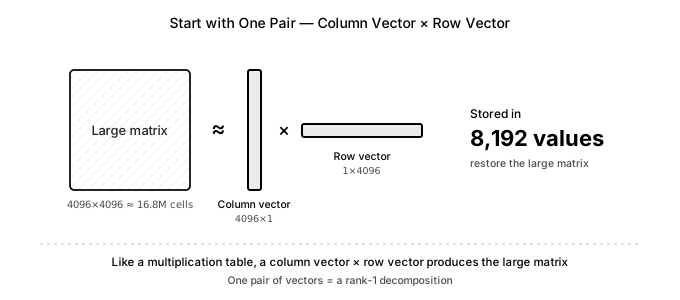
Using only one pair of vectors, though, can only represent very simple changes. So in practice you stack several pairs of vectors — and the count of stacked pairs is r (the rank). Stack r column vectors side by side and you get a small matrix (size 4096×r); stack r row vectors and you get another (size r×4096). These two matrices are the adapter. Multiply them together and you get the large matrix to add to the original. Larger r can capture more complex changes, but it also means more parameters to train, so it’s typically kept small — 8 or 16 is common.
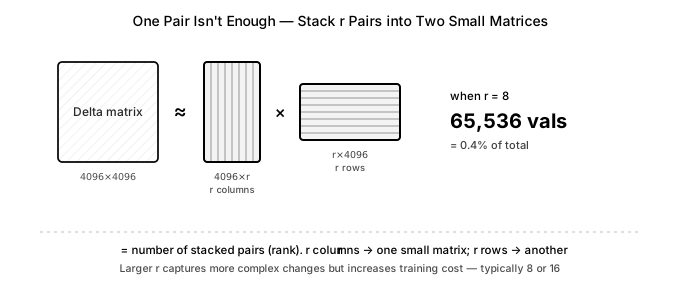
Let’s compare the parameter counts between LoRA and full fine-tuning numerically:
d, k, r = 4096, 4096, 8

full = d * k          # the entire delta matrix — ~16.77 million
lora = r * (d + k)    # two small matrices only — ~65,536

print(full)           # 16777216
print(lora)           # 65536
print(lora / full)    # 0.00390625  →  ~0.4%
Only 0.4% of the full count needs to be trained. The resulting matrix can’t capture every possible change, yet it produces results comparable to full fine-tuning. The reason is that fine-tuning is less about learning entirely new capabilities and more about amplifying the right ones from those the model already has. The delta matrix tends to be inherently low-rank, so small r works well, and in some tasks r=1 is sufficient.
At the start of training, one of the two matrices is initialized to zero so that the very first change is exactly zero. Starting without disturbing the original leads to more stable training.
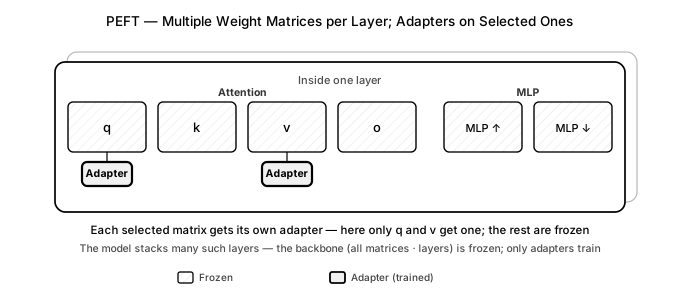
It’s also worth knowing where to attach the adapters. A model is many layers stacked, and each layer contains multiple weight matrices: attention’s q, k, v, o, and MLP weights, among others. Adapters are attached per-matrix, separately, and you don’t need to attach to all of them. When the budget is fixed, distributing adapters across multiple matrices — usually q and v — in small amounts typically outperforms concentrating them all in one matrix.
LoRA’s advantages are clear.
- Lightweight training — less than 1% of the weights are learned, so memory is light.
- Lightweight storage — no need to save an entire model per task; just the adapter (a few MB). Share the base model and swap adapters.
- No inference slowdown — before deployment, the two small matrices are merged into the original, leaving the model identical in size and speed.
Its limits are real too.
- Expressiveness has a ceiling — two small matrices can’t capture every change, so it may fall short of full fine-tuning on tasks very different from pretraining.
rand attachment points have to be chosen — too small is insufficient; too large erodes the advantage. Finding good values takes effort.- The full original model still sits in memory — only the training quantity shrinks; the frozen original (14 GB for 7B) occupies memory throughout training.
QLoRA — Adding Quantization on Top of LoRA
QLoRA (Quantized Low-Rank Adaptation) came after LoRA and addresses the memory cost of the heavy original model. The ‘Q’ stands for quantization — compressing the original model in size.
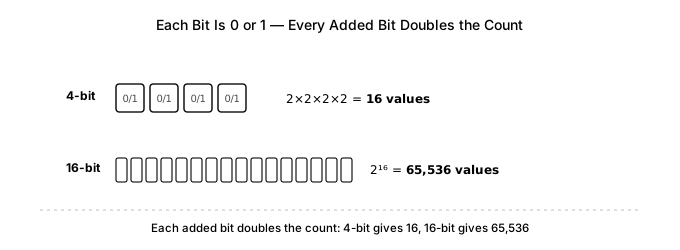
Quantization stores the original model’s weights in fewer bits than before. Weights are floating-point numbers like 0.0731 or -0.4412, normally stored in 16 bits (2 bytes) each. 16 bits can represent a value in about 65,536 steps. Dropping to 4 bits (0.5 bytes) leaves only 16 possible values. Each weight is then rounded to the nearest available value (for instance, 0.0731 might round to 0.08 — these are illustrative figures). The storage per number drops from 16 bits to 4 bits, a factor of four.
The key point is that 4-bit is the storage format — computation doesn’t happen in 4-bit. When a weight is needed for a multiplication, only that weight is momentarily dequantized to 16 bits for the calculation, then discarded. The crucial thing is that the entire model is never unpacked at once. All 7 billion weights stay in 4-bit storage; just the handful in use at any moment expand to 16-bit and then disappear. Like reading a compressed book by opening only the page you need — the model takes up its compressed size in memory the whole time.
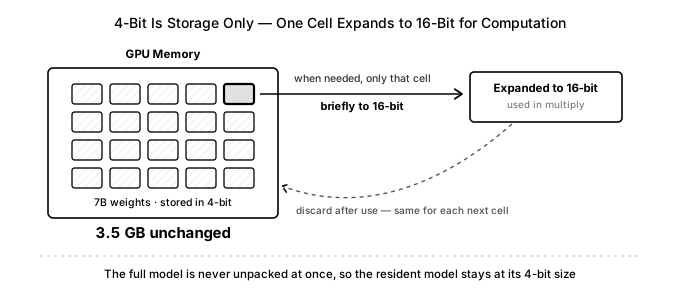
Not every part of the model uses the same bit width, though. The original model and the adapter use different bit widths.
- Original model — compressed to 4-bit and frozen. Read-only, so the bits can be reduced.
- LoRA adapter — trained in 16-bit.
The difference comes down to whether the values change. The original model only reads values for multiplication; the values themselves are static, so 4-bit storage is fine. The adapter, on the other hand, is updated incrementally throughout training — a tiny nudge like +0.0003 per step. If those updates are rounded back to 4-bit storage, that small change disappears into the rounding error and the values stay stuck, blocking learning. So 16-bit must be maintained while updates are accumulating.
A trained adapter can be quantized to 4-bit after training completes. In practice, though, the adapter typically occupies less than 1% of total memory, so it’s usually left in 16-bit without compressing.
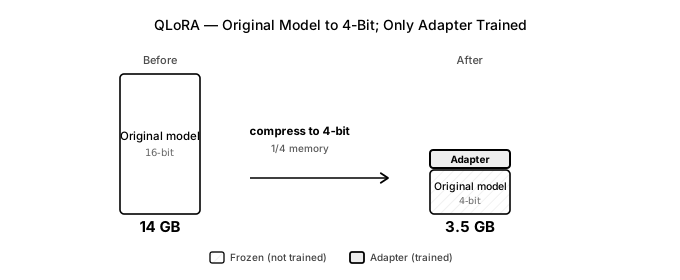
How much memory does the original model save?
params = 7_000_000_000           # 7 billion weights

fp16_gb = params * 2   / 1e9     # 16-bit (2 bytes) — ~14 GB
int4_gb = params * 0.5 / 1e9     # 4-bit (0.5 bytes) — ~3.5 GB

print(fp16_gb)                   # 14.0
print(int4_gb)                   # 3.5
14 GB drops to about 3.5 GB. Add in LoRA’s training memory savings and fine-tuning a 7B model on a single 24 GB consumer GPU becomes feasible. Full fine-tuning of the same 7B model would have needed 112 GB.
Naively dropping to 4-bit creates problems in several spots, though. QLoRA uses three techniques to address them — reducing rounding error (①), shrinking the overhead that comes with quantization (②), and preventing memory spikes during training (③).
① NF4 (NormalFloat 4-bit) — pack the available values close to zero. The 16 values available in 4-bit aren’t fixed in advance. Which number each code maps to is determined by a lookup table (codebook), and quantization works by rounding each weight to the nearest table value and storing only that code (4 bits). Reading it back means looking up the code in the table to recover the value.
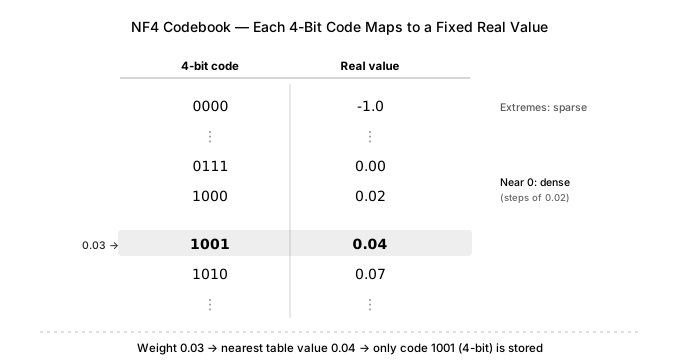
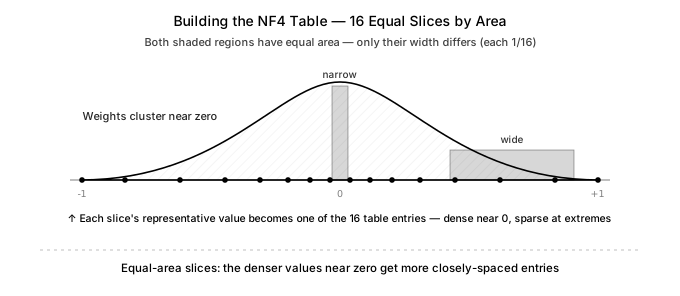
How are the 16 table values chosen? The key is dividing the area under a normal distribution into 16 equal slices. Model weights mostly follow a bell-shaped distribution centered near zero, like 0.03 or -0.05. The area under the curve is cut into 16 equally sized pieces, and one representative value (the midpoint of each piece) is written into the table. Near zero, where values are densely packed, each piece is narrow so the entries are closely spaced; at the extremes, where values are sparse, each piece is wide so the entries are far apart. The table naturally adapts to the weight distribution — and the ‘Normal’ in the name comes from this normal distribution.
Rounding the same weight 0.03 shows the difference clearly. (These are illustrative numbers, not the actual codebook values.)
- Evenly spaced table — nearest value is a distant
0→ error0.03 - NF4 table — nearest value is
0.04right next door → error0.01(one-third the error)
The NF4 values aren’t recomputed per model. They’re fixed constants determined once by the QLoRA researchers; every model uses the same table from the bitsandbytes quantization library.
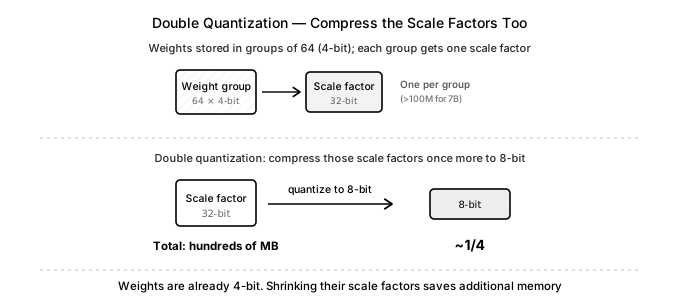
② Double quantization — quantize the scale factors that come with quantization. The NF4 table only knows values in the range -1 to 1, but real weights vary in scale from group to group. So weights are grouped in blocks of 64, and each block gets a scale factor that records its magnitude. Multiply the table value by the scale factor to restore the original scale. That one multiplication is all it takes to expand a 4-bit code to a 16-bit value.
The problem is that scale factors need to be precise, so they’re stored in 32-bit. There’s one per block, and a 7B model has over 100 million of them — that adds up to hundreds of MB. Double quantization quantizes those scale factors once more, to 8-bit, cutting their size to roughly one-quarter. The savings aren’t dramatic, but it shaves more memory with almost no quality cost.
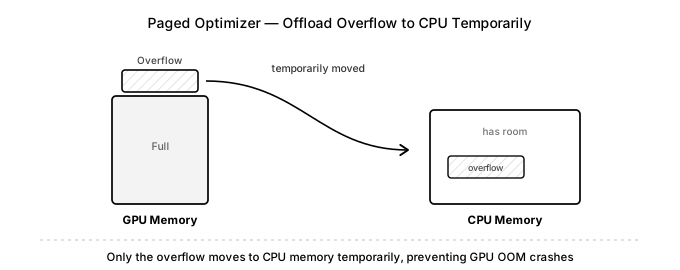
③ Paged optimizer — offload to CPU when memory overflows. Memory usage during training isn’t constant. Long inputs or certain steps cause sudden spikes that can exceed the GPU’s capacity even when it was fitting comfortably before — and when that happens, training crashes (OOM, Out of Memory). The paged optimizer temporarily moves the overflow to CPU memory and brings it back once the spike passes. It’s the same idea as an operating system using disk space when RAM runs out (virtual memory), preventing a momentary spike from killing the training run. Technically this is a general technique rather than something QLoRA-exclusive, but it’s especially valuable in QLoRA, where you’re pushing right against the limits of a single GPU’s memory.
QLoRA’s advantages are clear.
- Lowest memory footprint — compressing even the original model to 4-bit means it runs on less memory than plain LoRA. A single 24 GB card can fine-tune a 7B model; a single 48 GB card can reach 65B-class models.
- Quality stays nearly intact — results match 16-bit full fine-tuning.
Its limits exist too.
- Losses aren’t zero — quantization is lossy compression (rounding), so a small quality drop is possible.
- Computation slows slightly — dequantizing each 4-bit weight to 16-bit before every use adds overhead, stretching training and inference time.
Mini Experiment — LoRA vs QLoRA
You can run the code below yourself in this Colab notebook.
Let me verify what I’ve covered so far through actual code. I’ll run the same setup twice — LoRA (adapter on a 16-bit original model) and QLoRA (adapter on a 4-bit compressed original model). The three things I want to check:
- Fine-tuning effect — does the model solve a task after training that it couldn’t solve from prompts alone? Measured by accuracy.
- LoRA advantage — how small are the trainable parameters and the saved file?
- QLoRA trade-off — how much does memory shrink, and how much does time grow?
The task is classifying news articles into four categories: World, Sports, Business, Sci/Tech. There are correct answers, so I can compare accuracy before and after training. The model is pretrained-only Qwen/Qwen2.5-0.5B (~1 GB in 16-bit); the data is 1,000 samples from the fancyzhx/ag_news classification dataset.
① Shared setup — data and adapter config
Instructions and outputs are concatenated in ### Instruction / ### Response format with the correct label in the response slot. 50 test samples for scoring are taken from a separate test split, not used in training.
import torch
from datasets import load_dataset
from transformers import AutoModelForCausalLM, AutoTokenizer, BitsAndBytesConfig
from peft import LoraConfig
from trl import SFTConfig, SFTTrainer

MODEL = "Qwen/Qwen2.5-0.5B"
tokenizer = AutoTokenizer.from_pretrained(MODEL)

LABELS = ["World", "Sports", "Business", "Sci/Tech"]
TEMPLATE = (
    "### Instruction:\n"
    "Classify the news into one of: World, Sports, Business, Sci/Tech.\n\n"
    "{}\n\n"
    "### Response:\n{}"
)

# 1,000 training samples — instruction, article, and label joined into one string, EOS appended
raw = load_dataset("fancyzhx/ag_news", split="train").shuffle(seed=42).select(range(1000))
data = raw.map(
    lambda r: {"text": TEMPLATE.format(r["text"], LABELS[r["label"]]) + tokenizer.eos_token},
    remove_columns=raw.column_names,
)

# 50 test samples for accuracy measurement (not used in training)
test = load_dataset("fancyzhx/ag_news", split="test").shuffle(seed=42).select(range(50))

# Adapter config — shared by LoRA and QLoRA
lora = LoraConfig(
    r=16, lora_alpha=32,
    target_modules="all-linear",   # attach to all linear layers for a quick experiment
    lora_dropout=0.05, task_type="CAUSAL_LM",
)
Attaching to every linear layer (all-linear) makes the changes visible in fewer steps, but even so only 1.7% of the total weights are trained.
② Training function — a single function parameterized by quantization flag
The only difference in code between the two experiments is whether the original model is loaded in 4-bit, so a single function handles both.
def train(quantize):
    # QLoRA's 'Q' — load the original in 4-bit (None for LoRA)
    bnb = BitsAndBytesConfig(
        load_in_4bit=True,
        bnb_4bit_quant_type="nf4",               # ① NF4
        bnb_4bit_use_double_quant=True,          # ② double quantization
        bnb_4bit_compute_dtype=torch.float16,    # T4 doesn't support bf16, so use fp16
    ) if quantize else None

    model = AutoModelForCausalLM.from_pretrained(
        MODEL, quantization_config=bnb, dtype=torch.float16, device_map="auto")
    print(f"Resident memory: {model.get_memory_footprint() / 1e9:.1f} GB")

    torch.cuda.reset_peak_memory_stats()
    trainer = SFTTrainer(
        model=model, train_dataset=data, peft_config=lora,
        args=SFTConfig(
            max_steps=100, per_device_train_batch_size=4,
            learning_rate=2e-4, max_length=256, packing=True,
            fp16=True, warmup_steps=10, logging_steps=10,
        ),
    )

    # When loaded in 4-bit, adapter parameters are initialized in bf16, which T4 doesn't support.
    # fp16 AMP assumes "fp32 master weights, fp16 compute," so cast adapters to fp32.
    if quantize:
        for p in trainer.model.parameters():
            if p.requires_grad:
                p.data = p.data.to(torch.float32)

    trainer.model.print_trainable_parameters()
    runtime = trainer.train().metrics["train_runtime"]
    print(f"Peak memory: {torch.cuda.max_memory_allocated() / 1e9:.1f} GB")
    print(f"Training time: {runtime / 60:.1f} min")
    trainer.model.eval()   # training done — disable dropout and switch to generation mode
    return trainer
fp16=Truestabilizes training on T4;packing=Trueconcatenates short examples to speed things up. The paged optimizer isn’t used here because a 0.5B model leaves plenty of memory headroom.
③ LoRA — accuracy before and after fine-tuning
trainer = train(quantize=False)
# Resident memory: 1.0 GB
# trainable params: 8,798,208 || all params: 502,830,976 || trainable%: 1.7497
Only 1.7% of the total weights are trained (LoRA advantage). The frozen 16-bit original 1 GB, however, occupies memory throughout training (LoRA limit).
Now I run the 50 test samples with the adapter disabled (disable_adapter, base) and with it enabled (trained model) to measure accuracy.
def classify(model, text):
    prompt = TEMPLATE.format(text, "")                 # up to "### Response:\n"
    ids = tokenizer(prompt, return_tensors="pt").to(model.device)
    out = model.generate(**ids, max_new_tokens=8)
    gen = tokenizer.decode(out[0][ids.input_ids.shape[-1]:], skip_special_tokens=True)
    pos = {l: gen.find(l) for l in LABELS if l in gen}   # first label that appears = prediction
    return min(pos, key=pos.get) if pos else None

def accuracy(model):
    correct = sum(classify(model, r["text"]) == LABELS[r["label"]] for r in test)
    print(f"Accuracy: {correct}/{len(test)} = {correct/len(test):.0%}")

with trainer.model.disable_adapter():
    accuracy(trainer.model)   # before training (base)
accuracy(trainer.model)       # after training (LoRA)
[before · base] Accuracy: 7/50 = 14%
[after · LoRA] Accuracy: 40/50 = 80%Where the gap comes from is obvious once you run the same article through both and put the outputs side by side.
def generate(model, text):
    prompt = TEMPLATE.format(text, "")
    ids = tokenizer(prompt, return_tensors="pt").to(model.device)
    out = model.generate(**ids, max_new_tokens=8)
    return tokenizer.decode(out[0][ids.input_ids.shape[-1]:], skip_special_tokens=True).strip()

for r in test.select(range(3)):
    with trainer.model.disable_adapter():
        base = generate(trainer.model, r["text"])   # base
    lora = generate(trainer.model, r["text"])        # trained
    print(f"[Label: {LABELS[r['label']]}] {r['text'][:50]}...")
    print(f"  Base: {base!r}")
    print(f"  LoRA: {lora!r}")
[Label: Sports] Indian board plans own telecast of Australia series...
Base: 'The Indian cricket board has decided to broadcast'
LoRA: 'Sports'
[Label: Business] Stocks Higher on Drop in Jobless Claims A sharp dr...
Base: 'The news is that the stock market is'
LoRA: 'Business'
[Label: Sports] Nuggets 112, Raptors 106 Carmelo Anthony scored 3...
Base: 'The news is about a basketball game between'
LoRA: 'Sports'Even with a list of labels in the prompt, the base model ignores classification entirely and continues the news text — while the trained model gives exactly one label as the answer. A model that couldn’t produce useful output from prompts alone becomes a functional classifier after a small amount of training.
Save only the adapter (LoRA advantage), then clear GPU memory for the next run.
trainer.save_model("adapter-lora")   # adapter only, tens of MB — no need to save the 1 GB base

del trainer
import gc; gc.collect()
torch.cuda.empty_cache()
④ QLoRA — verifying the memory reduction
trainer = train(quantize=True)
accuracy(trainer.model)   # similar accuracy to the LoRA trained model
Resident memory is lower than LoRA. The exact reduction, along with training time and accuracy, are compared side by side in the table below.
⑤ Results summary
| LoRA (16-bit original) | QLoRA (4-bit original) | |
|---|---|---|
| Resident memory | 1.0 GB | 0.5 GB |
| Peak training memory | 3.5 GB | 3.0 GB |
| Training time | 0.9 min | 1.0 min |
| Weights trained | 1.7% of total | 1.7% of total |
| Classification accuracy (14% before training) | 80% | ~80% |
Training 1.7% of the weights lifted accuracy from 14% → 80%.
- LoRA — training and storage targets are small. Save only the adapter, tens of MB.
- QLoRA — compressing the original to 4-bit cut resident memory in half (1.0 → 0.5 GB). In exchange, the compression-and-decompression overhead added a little time (0.9 → 1.0 min), and accuracy stayed roughly on par with LoRA.
Wrapping Up
That covers fine-tuning and, more specifically, PEFT. So when would you actually reach for these in practice?
As I showed earlier, fine-tuning changes behavior, not the model’s underlying knowledge. So it’s useful when you want a consistent tone or persona, when you need to lock the output into a specific format, or when you want to bake in instructions you’d otherwise have to prepend to every prompt — saving on prompt cost.
That said, it’s rare to jump straight to fine-tuning the moment something isn’t working. You’d usually start with cheaper, faster options. First try prompting — refine the instructions and examples. If the model is blocked because it’s missing a fact, bring in the relevant documents through RAG. Fine-tuning is the last resort when neither of those gets you the behavior you want.
Of course, that order isn’t a strict pipeline where you have to try each step in sequence. The three approaches solve genuinely different problems. If the model is missing knowledge, RAG is the answer; if the behavior isn’t landing right, fine-tuning is. The reason trying to teach the model new knowledge through fine-tuning rarely works is that knowledge retrieval is what RAG is built for.
This post may contain factual or interpretive errors. If you spot anything wrong or have a question, feel free to leave a comment.
Reference
- https://arxiv.org/abs/2106.09685 — Hu et al. 2021, “LoRA: Low-Rank Adaptation of Large Language Models”
- https://arxiv.org/abs/2305.14314 — Dettmers et al. 2023, “QLoRA: Efficient Finetuning of Quantized LLMs”