So, What Is RAG?
- #AI
- #RAG
- #Embedding
- #Vector Search
- #LLM
I’ve recently been studying RAG in depth, with plenty of hands-on practice, and along the way a fair number of things left me wanting to dig deeper. This post pulls together what I learned and what I went on to study on my own afterward.
A general-purpose LLM only knows what it saw during training. My company’s internal documents and the latest material aren’t in the model. The simplest way to fill that gap is to paste the relevant text straight into the prompt, but then you have to hunt down the right material by hand every time, and how much you can add is capped by the context window.
RAG (retrieval-augmented generation) retrieves the relevant documents on the fly when a question comes in, slips them into the prompt, and answers from there. To update its knowledge you just swap the documents, and it can even cite which material it drew on. That makes it a better fit than fine-tuning or prompting when you’re dealing with fast-changing knowledge or internal documents. In this post I’ll lay out what RAG is and how it works, and walk through a small hands-on exercise.
What Is RAG?
Why RAG was needed
An LLM’s knowledge is frozen into its weights the moment training ends. That creates three problems.
- Knowledge is hard to fix or extend. Anything published after training, or any document you keep on your own, is unknown to the model. Teaching it means retraining, which is expensive.
- It can’t show its sources. There’s no way to trace which material an answer came from inside the model.
- It hallucinates. Faced with something it doesn’t know, it doesn’t stop — it makes up something plausible.
Instead of carving knowledge into the weights, RAG pulls it from external documents. That resolves all three problems naturally.
A definition
RAG (retrieval-augmented generation) is exactly what the name says: generation augmented by retrieval. When a question arrives, it first retrieves the relevant documents, then feeds those documents to the model alongside the question to generate an answer. Rather than relying only on the knowledge baked into the weights, it also uses knowledge fetched from external documents in the moment.
The core structure — retriever and generator
The flow is simple.
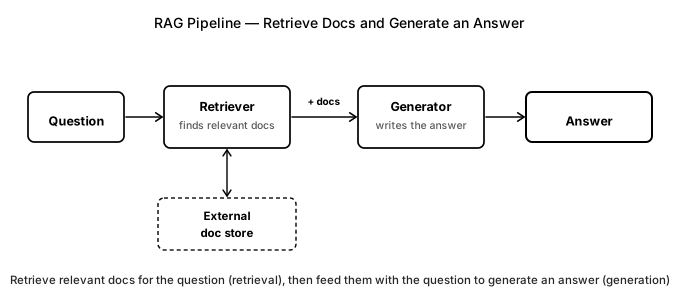
The two core parts of RAG are the retriever and the generator.
- Retriever: takes the question and finds relevant documents in an external document store.
- Generator: takes the question and the retrieved documents together and writes the answer. This is the role played by the LLM we normally use.
The catch is that the external store the retriever searches has to be filled in advance. Before any question arrives, you need a preparation step that processes the documents into a searchable form and stores them — I’ll cover that step and how retrieval works in the next section.
How do you feed the retrieved documents to the model?
The paper that first proposed RAG split the way retrieved documents are used into two approaches: RAG-Sequence and RAG-Token.
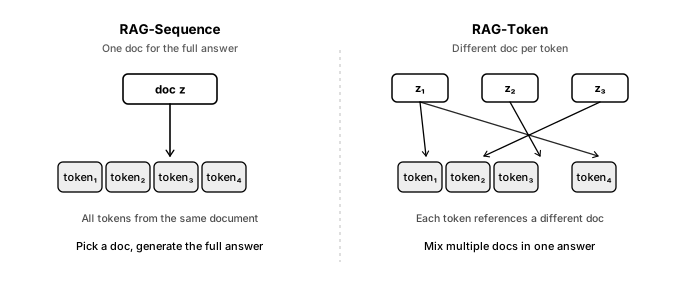
- RAG-Sequence: picks a single document and writes the entire answer from it.
- RAG-Token: consults a different document at each token while generating, so one answer can blend several documents.
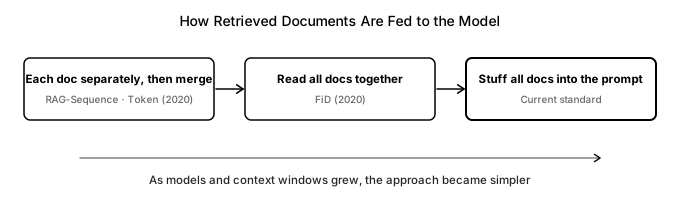
There was a reason for the split. BART, the generator at the time, had a small context window, so you couldn’t drop several whole documents into the prompt at once. That called for a workaround: feed the documents in one at a time and combine the results.
The field then moved toward “let the model read several documents together at once” (FiD, Fusion-in-Decoder). As LLMs grew and context windows widened, we arrived at today’s approach: attach all the retrieved documents to the prompt and let the model read them in one pass. The better the models got, the less these workarounds were needed.
That said, you don’t always feed documents in verbatim. Including irrelevant parts drives up cost and muddies the answer, so it’s common to trim to just the relevant portion or summarize it first. Reranking, prompt compression (LLMLingua), and query-focused summarization are all examples.
What’s interesting is that as the context windows of newer models stretch to hundreds of thousands of tokens, there’s an active debate: “why bother retrieving — just put everything in.” But there’s an equally strong counterargument that the more you stuff in, the higher the cost and the easier it is to be led astray by irrelevant content, so RAG’s job of picking out only what’s needed is still worthwhile.
How RAG Works
The RAG pipeline splits into two big stages: an indexing stage that stores documents in a searchable form before any question arrives, and an answer-generation stage that searches that store to answer once a question comes in.
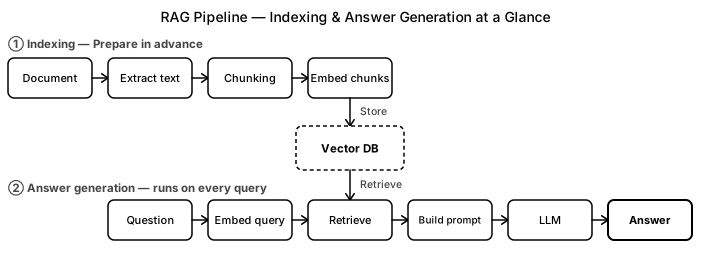
Indexing — storing documents ahead of time
This is the preparation stage: before any question arrives, you store the documents you’ll use in a vector DB so the answer-generation stage can search them.
1. Extract text from the documents
Documents come in all kinds — PDF, Word, HTML, web pages. You can’t search them as-is, so first you pull out the plain text.

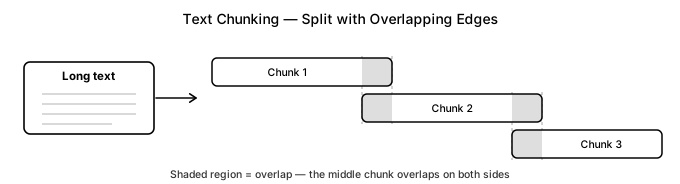
2. Chunking
Handle a document as one big blob and several topics get mixed into a single piece, which blurs retrieval. You have to break it into small pieces so you can pull out just the chunk that fits the question.
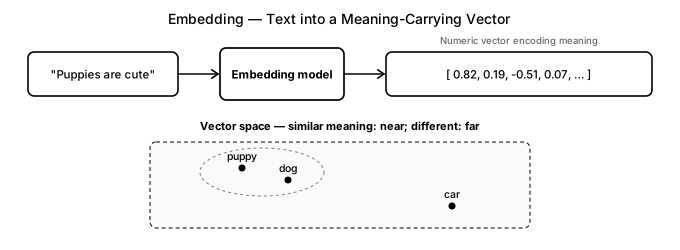
3. Embed the chunks
Each chunk goes into an embedding model that turns it into a numeric vector carrying its meaning. That way, whether two things are similar can be judged by whether their vectors are close, not by whether their words overlap.
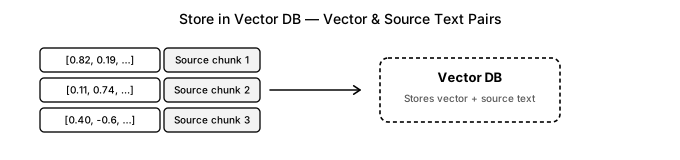
4. Store in the vector DB
You store each vector paired with its original text. The “external document store” I mentioned earlier is exactly this vector DB. It’s a database specialized for quickly computing distance (similarity) between vectors and returning the closest ones first, so it can efficiently find the vectors nearest the question and hand the paired source text to the model.
Answer generation — retrieve and answer when a question arrives
This is the process that repeats every time a question comes in, using the vector DB you built.
1. Embed the question
The question is turned into a vector too. Here you must use the same model you used to embed the documents during indexing. A different model means a different vector space, so you couldn’t compare the distance between question and documents.

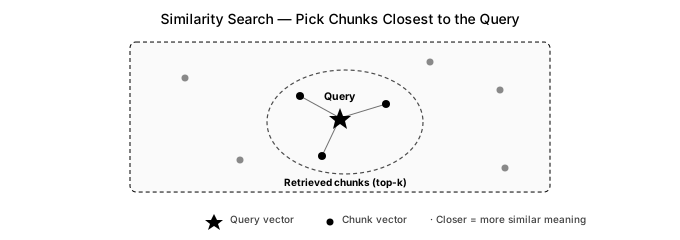
2. Retrieval
Among the stored chunks, you find the ones relevant to the question. There are many ways to search, but RAG usually uses similarity search: measure the distance between the question vector and the stored chunk vectors and take the closest few. Distance is typically measured with cosine similarity, which looks at the angle between two vectors to see how close their directions are. The closer the direction, the closer the meaning — so the nearest chunks are the information most relevant to the question.
3. Assemble the prompt
You take the retrieved information as context and pass it to the model along with the question. In practice, the rules for answering (the instructions) often go in the system prompt, while the context and question go in the user message.
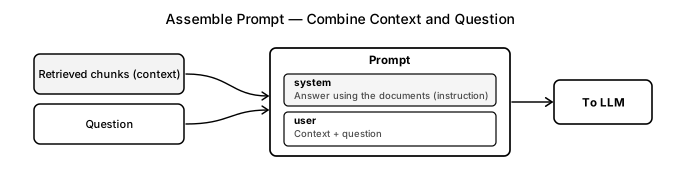
4. LLM generation
The model writes the final answer grounded in that evidence.

Hands-on — RAG over a PDF
The full code is in
exercise/rag_pdf.ipynbin the GitHub repo.
Let’s go deeper into what I laid out above, through code. As an example, I’ll take a company employment-policy PDF and build an internal Q&A setup: employees can ask what they want to know instead of digging through the rules themselves. The libraries I’ll use are:
pypdf: extract text from the PDFopenai: embeddings and answer generationchromadb: the vector DB
A framework like LangChain would make this simpler, but I’m skipping it here so we can watch the process of text becoming vectors and being retrieved firsthand. The generation model is swappable like a module, so you could switch to Claude or a local model.
pip install openai chromadb pypdffrom openai import OpenAI
client = OpenAI() # reads the OPENAI_API_KEY environment variableIndexing — the stage where documents are stored in the vector DB before any question arrives.
1. Extract text from the document
from pypdf import PdfReader

reader = PdfReader("employment_policy.pdf")
text = "\n".join(page.extract_text() or "" for page in reader.pages)
This pulls the text out page by page and joins it into one string. PDFs heavy with tables or images can extract poorly, so it’s worth eyeballing the result of this step once.
Tables and images aren’t text, so to feed them to a text embedding model you first have to turn them into text — convert tables to Markdown tables, and pull descriptions from images with OCR or a vision model.
2. Chunk the text
def chunk_text(text, chunk_size=500, overlap=50):
    chunks, start = [], 0
    while start < len(text):
        chunks.append(text[start:start + chunk_size])
        start += chunk_size - overlap
    return chunks

chunks = chunk_text(text, chunk_size=500, overlap=50)chunk_size(the length of one piece): too large and one piece mixes several topics, blurring retrieval; too small and the context breaks.overlap(the overlap between pieces): to keep a sentence from being cut off at a boundary and losing its context, you carry a little of the end of one piece into the next.
Here I split it crudely by character count, but chunking strategies vary — splitting on sentence or paragraph boundaries, or by semantic unit. How you split makes a real difference to retrieval quality.
3. Embed and store in the vector DB
import chromadb

# embed all the chunks at once
resp = client.embeddings.create(model="text-embedding-3-small", input=chunks)
embeddings = [d.embedding for d in resp.data]

# store the vectors together with their source text in the vector DB
db = chromadb.PersistentClient(path="./chroma_db")
collection = db.get_or_create_collection("docs")
collection.add(
    ids=[f"chunk-{i}" for i in range(len(chunks))],
    embeddings=embeddings,
    documents=chunks,
)model="text-embedding-3-small"(the embedding model): turns each chunk into a 1536-dimensional vector. Among OpenAI’s embedding models,smallis cheaper and faster thanlargewhile still handling quality well enough for practice. At query time you must use the same model so the question and the documents land in the same space.- Store the source text alongside in
documents, because you need to pull the source text of a retrieved vector and hand it to the model.
Answer generation — the stage that repeats every time a question comes in.
4. Embed the question and run similarity search
question = "How many days of annual leave can I take?"

q_emb = client.embeddings.create(
    model="text-embedding-3-small", input=question
).data[0].embedding

results = collection.query(query_embeddings=[q_emb], n_results=3)
retrieved = results["documents"][0]
The question is turned into a vector with the same embedding model, then the nearest chunks are found.
n_results(top-k, the number of chunks to fetch): too few and the evidence the answer needs is missing; too many and irrelevant content creeps in, blurring the answer and raising cost.
5. Assemble the prompt and generate
context = "\n\n".join(retrieved)

resp = client.chat.completions.create(
    model="gpt-4o-mini",
    messages=[
        {"role": "system", "content": "Answer the question based on the following documents. If the answer isn't in them, say you don't know."},
        {"role": "user", "content": f"[Documents]\n{context}\n\n[Question]\n{question}"},
    ],
    temperature=0,
)
print(resp.choices[0].message.content)- Splitting the messages: the rules for answering (the instructions) go in
system, and the retrieved context and the question go inuser. Splitting by role rather than mashing everything into one string is the norm. - The one line “if it’s not in the documents, say you don’t know” in the system prompt curbs hallucination. When retrieval brings back the wrong thing, it makes the model admit it doesn’t know instead of inventing an answer. Prompt design has a lot of room to improve — you can force citations, give few-shot examples, and more.
temperature=0: removes randomness to get an answer faithful to the documents. It usually ranges from 0 to 2; keep it low (around 0 to 0.3) for fact-seeking work like RAG, and raise it (0.7 and up) for creative writing.
The result
Ask the same question of the LLM without RAG and, since the model doesn’t know the PDF’s contents, it answers with generalities or makes up something false. Run it through the pipeline above and it answers precisely, grounded in what it found in the document. If you also store the page number in metadatas when saving, you can show evidence like “Source: p.12” alongside the answer.
This is the most basic form of RAG, so the results may not fully satisfy. I’d love for you to experiment yourself — vary the system prompt, the chunking parameters (chunk_size, overlap), and n_results above, and watch how the answer changes.
Prompt engineering vs RAG vs fine-tuning
I covered fine-tuning in the previous post and RAG in this one. Add prompt engineering to those, and the three are tools for different problems — it’s not a matter of picking just one.
- Prompt engineering touches neither the model nor the data; it draws out the answer you want through good instructions and examples.
- RAG brings in the knowledge the model uses from the outside. It leaves the weights alone and has the model consult retrieved documents in the moment.
- Fine-tuning changes the model’s behavior. It trains the weights to reinforce tone, output format, or performance on a specific task.
The three operate in genuinely different territory.
| Prompt engineering | RAG | Fine-tuning | |
|---|---|---|---|
| What it does | Guides answers with instructions/examples | Injects external knowledge | Learns behavior/style |
| Updating knowledge | By hand each time | Swap documents | Retrain |
| Cost / data | Almost none | Low / documents | High / hundreds to thousands of examples |
| Citing sources | Hard | Possible | Not possible |
| Weakness | Context limits | Depends on retrieval quality | Makes up specific facts |
So one can’t stand in for another. Try to make fine-tuning memorize new knowledge and the model hallucinates, plausibly inventing what it doesn’t have; RAG, meanwhile, can’t change tone or format. Work that needs knowledge falls to RAG; work that changes the model’s behavior falls to fine-tuning.
That’s why real services mix these methods — RAG to supply up-to-date knowledge, fine-tuning to lock in tone and format, for instance. The usual order is to start with prompt engineering, add RAG when that falls short, and add fine-tuning when that still isn’t enough. You reach for the simple, cheap method first and only climb to the heavier, more expensive one when you have to.
Wrapping up
This post covered what RAG is and why it’s needed, how it works across the two stages of indexing and answer generation, and a hands-on exercise building RAG from a PDF. Answering by retrieving external documents without touching the weights makes RAG a practical choice when you have to deal with fast-changing knowledge or your own documents. What I built here is just the basic form — there’s plenty of room to advance it with chunking, hybrid search, reranking, and more. It’s widely used wherever you have to deal with “my data that the model doesn’t know” — internal document chatbots, product-manual-based customer support, search-style AI assistants.
This post may contain factual or interpretive errors. If you spot anything wrong or have a question, feel free to leave a comment.
Reference
- Lewis et al., Retrieval-Augmented Generation for Knowledge-Intensive NLP Tasks (NeurIPS 2020) — the paper that first proposed RAG
- Izacard & Grave, Leveraging Passage Retrieval with Generative Models for Open Domain Question Answering (EACL 2021) — FiD, reading multiple documents together in the decoder
- In Defense of RAG in the Era of Long-Context Language Models (2024) — on whether RAG is still needed now that context windows are long
- RAG vs Fine-tuning: Pipelines, Tradeoffs, and a Case Study on Agriculture (2024) — a case study directly comparing fine-tuning and RAG
- IBM, RAG vs fine-tuning vs prompt engineering — criteria for choosing among the three methods