So, What Is Multimodal?
- #AI
- #Multimodal
- #CLIP
- #Vision-Language
- #LLM
I’ve been studying multimodal AI — what a modality is, how AI grew from text into multimodal, and building a multimodal RAG myself. This post gathers what I learned along with what I dug into afterward.
The models I’d looked at so far were text-to-text — text in, text out. But how are those Ghibli-style images that went viral made, or the back-and-forth voice conversations with ChatGPT? Writing a prompt to get a picture, or speaking to get a spoken reply, has quietly become normal. AI moving beyond text to handle multiple kinds of input and output — that’s multimodal. Let’s go through what multimodal means, how it developed, how inputs and outputs work across modalities, and especially how video fits in.
What Is Multimodal?
The modal in multimodal is short for modality. A modality is a type, or channel, through which information arrives. Each distinct form of data — text, images, audio, video, tables — is a modality.
- Unimodal: handles one type only. Early GPT (text only) and ResNet (images) are examples.
- Multimodal: understands or generates two or more types together. A model that reads a photo and writes a description, or listens to speech and replies, is multimodal.
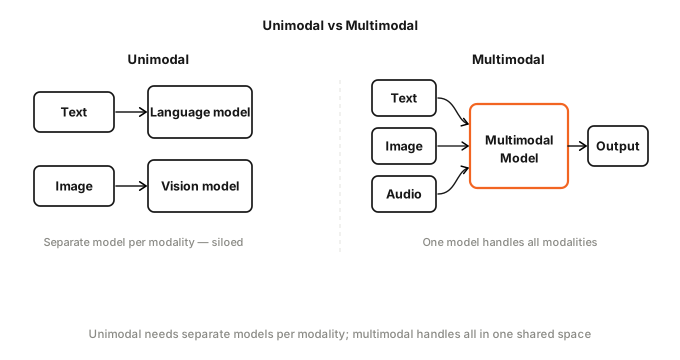
The key isn’t simply “accepts multiple kinds of input.” The essence of multimodal is aligning different modalities in the same vector space. A vector space (or semantic space) is a space where data is converted into numeric vectors, and things with similar meanings cluster together. Put the word “dog” and a photo of a dog into the same space, and the two end up near each other.
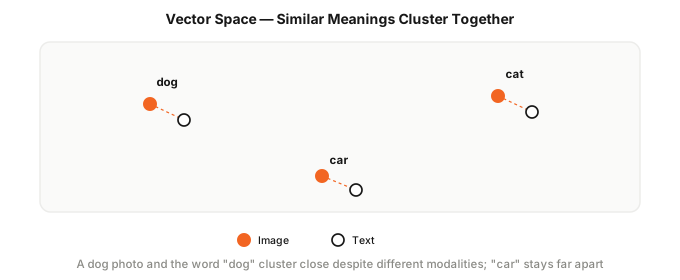
Getting data of completely different forms into the same space is multimodal’s core challenge. Let’s look at the history of how it was solved.
A Brief History of Multimodal
Until recently, AI handled text and images separately, with audio and video joining later.
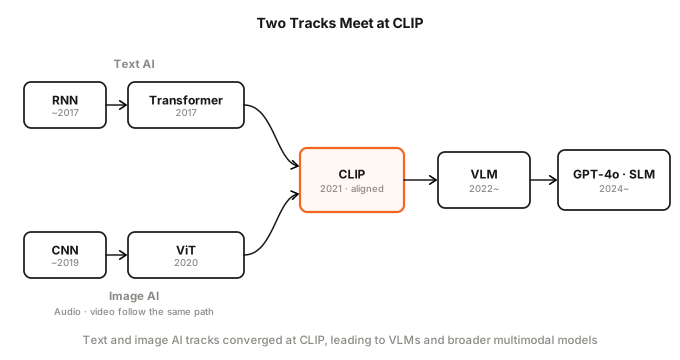
Text: RNN → Transformer
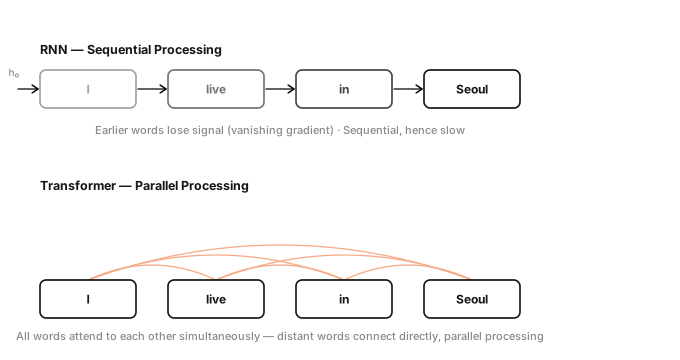
Before 2017, the workhorse of text AI was the RNN (Recurrent Neural Network). It read a sentence one word at a time, compressing everything it had read so far into a single vector before passing it to the next word. The problem: the further along the sentence, the more the earlier parts faded away (vanishing gradient). And because words were processed in order, parallelization was impossible — making it slow.
Google’s Transformer in 2017 solved both at once. The key is self-attention: every word in a sentence attends to every other word simultaneously and directly. That enables parallelism and lets words far apart connect immediately. I covered how attention works in a previous post. BERT and GPT followed, ushering in the golden age of text AI. But all of them dealt with text only. Images were completely beyond them.
Images: CNN → ViT
On the image side, CNN (Convolutional Neural Network) ruled. CNN’s heart is a small filter. You slide a few-pixel filter across the image asking “is this pattern here?” The early layers pick up simple patterns — edges, color transitions. Stack more filter layers on top and each layer combines the simple patterns found by the one below into something more complex. Edges become curves, curves become eyes and noses, and eventually the network arrives at a face — outputting a classification score like “cat: 92%”.
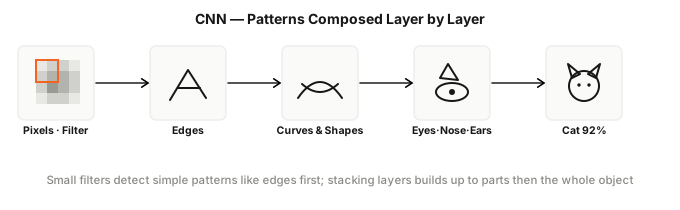
It classified well, but had two limits. First, it couldn’t generate text — it could say “cat” but had no answer to “describe this photo.” Second, it couldn’t be combined with text AI. The number arrays that CNN produced and the ones that Transformer produced looked the same on the surface — just vectors of real numbers — but they were built on entirely different scales. Adding or comparing the two was like adding kilometers to kilograms.
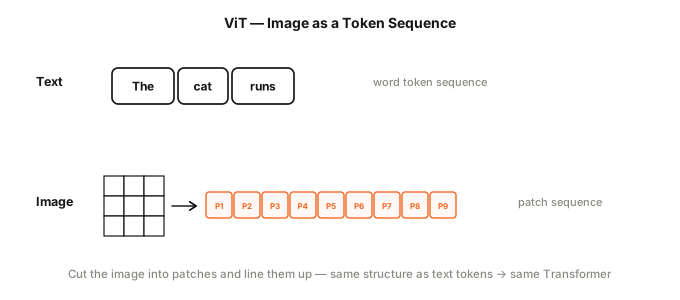
Google’s ViT (Vision Transformer) in 2020 flipped the approach. Treating every pixel as a token means about 50,000 tokens for a 224×224 image — far too many for self-attention to handle (attention scales quadratically with token count).
So ViT splits the image into 16×16 blocks (patches). A 224×224 image becomes 196 patches, and each patch becomes one token. Lined up like that, the structure is identical to a sequence of text tokens, and the image can be processed the same way — with a Transformer. Showing that both AI types could run on the same machinery was the technical starting point for multimodal.
Audio and Video
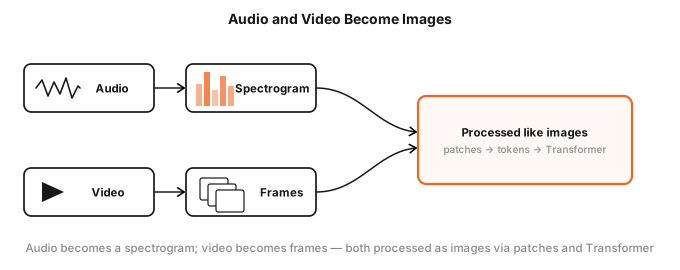
Audio and video didn’t develop on their own separate tracks — they borrowed the same techniques as images. Sound can be converted into a spectrogram (a picture of frequency intensity over time), after which it can be treated as a single image. Video contains both picture and sound: the picture is a sequence of frames, each of which is an image, and the sound becomes a spectrogram. So both can ultimately be converted into images. Once images started being processed by Transformers, audio and video naturally followed the same path.
Text AI couldn’t understand images, and image AI couldn’t produce text. Worse, their output vectors lived in different coordinate systems, so they couldn’t be combined or compared. The model that solved the problem of aligning different modalities into the same space was CLIP.
CLIP
CLIP (Contrastive Language-Image Pre-training) pre-trains language and images together using a contrastive approach. It trains an image encoder and a text encoder to produce vectors of the same dimension, so a photo of a dog and the word “dog” end up close to each other in the same space. The training data is hundreds of millions of (image, caption) pairs collected from the web.
Contrastive Learning
With N (image, caption) pairs in a batch, you get an N×N grid of images against captions. Only the N pairs on the diagonal are correct; everything else is a mismatch.
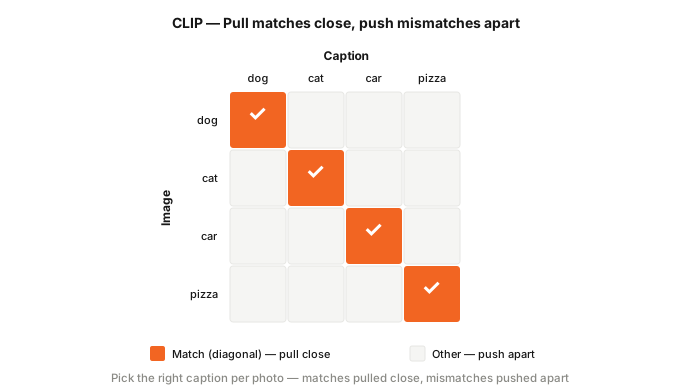
The diagonal (correct pairs) is trained to bring the two vectors closer; everything else (mismatches) is trained to push them apart. It’s like a multiple-choice problem: “pick the right caption from N options for this photo.” Closeness is measured by cosine similarity — 1 when two vectors point the same direction, −1 when they point opposite. In code:
# encode N images and N captions into vectors
img_vecs = image_encoder(images)    # (N, d)
txt_vecs = text_encoder(captions)   # (N, d)

# similarity for every combination → N×N grid
sim = img_vecs @ txt_vecs.T         # (N, N)

# correct pairs are on the diagonal: image 0 goes with caption 0, image 1 with caption 1 ...
labels = range(N)

# "each image should pick the right caption" + "each caption should pick the right image"
loss = cross_entropy(sim, labels) + cross_entropy(sim.T, labels)
cross_entropy is the loss function. Adding the loss in both directions — finding the right caption for an image, and the right image for a caption — trains both sides together.
Zero-shot Classification
After solving that multiple-choice problem hundreds of millions of times, images and text are aligned in the same vector space. That means CLIP can handle tasks it never saw during training — without any extra training. The clearest example is zero-shot classification.
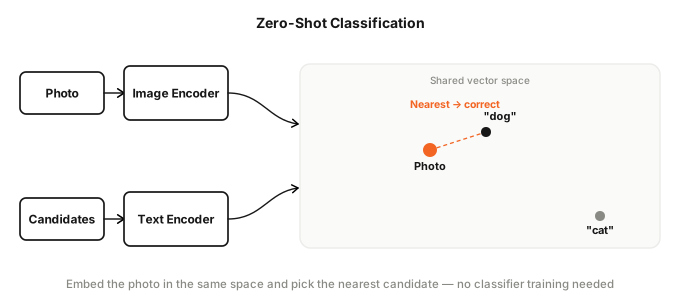
# no separate "dog vs cat" classifier ever trained
candidates = ["a photo of a dog", "a photo of a cat"]
img = image_encoder(my_image)
txt = text_encoder(candidates)
answer = candidates[(img @ txt.T).argmax()]   # pick the closer sentence
Just swap the candidate sentences and you can classify anything — no retraining needed. That’s why CLIP was a turning point for multimodal: once modalities are aligned, a wide range of applications becomes possible.
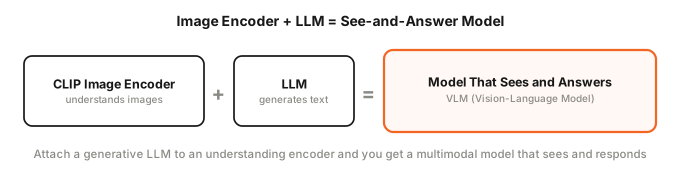
CLIP only compares how similar an image and a text are — it can’t look at an image and generate a sentence. But attach an LLM to the CLIP-aligned image encoder, and you get a model that can look at an image and answer questions about it.
Inputs and Outputs
The “model that sees and answers” above takes multimodal input and produces text. Flip the direction and you can generate images from text. Multimodal systems split into three kinds depending on which side — input or output — is multimodal.
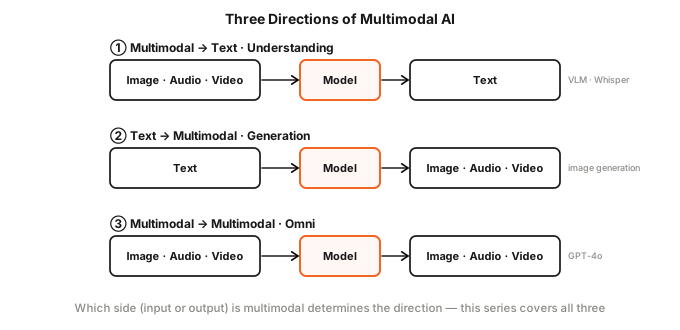
- Multimodal input → text output (understanding): receives photos or speech and writes descriptions or answers.
- Text input → multimodal output (generation): creates images or audio from text.
- Multimodal input → multimodal output (omni): receives multiple modalities and responds in multiple modalities. GPT-4o falls here.
Input
The approach for feeding non-text modalities into an LLM is the same regardless of the modality. A dedicated encoder pulls out a vector for each modality, a projector converts it into something the LLM can understand like a token, and those tokens are lined up with text tokens.
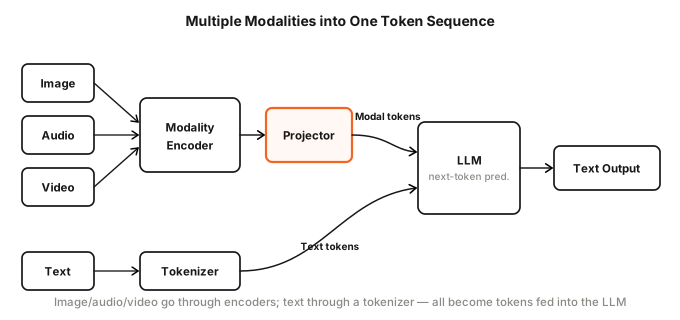
The encoder depends on the modality.
- Images: ViT. The image is cut into patches and each patch is turned into a vector. A ViT pre-aligned via CLIP is commonly used.
- Audio: the sound is converted into a spectrogram (an image), then that image is processed by a ViT. AST (Audio Spectrogram Transformer) — which cuts the spectrogram into patches and feeds them to a ViT — is the standard approach. For speech, Whisper’s encoder is sometimes used instead.
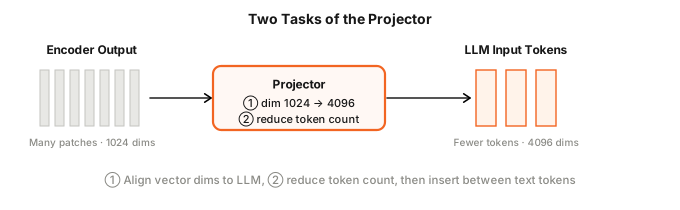
The projector converts the vectors the encoder produces into a form the LLM can accept. It handles two main things.
- Dimension alignment: the encoder’s output vectors and the LLM’s tokens have different dimensions. A ViT might output 1024-dimensional vectors while the LLM expects 4096. The projector converts 1024 to 4096 to match. The simplest approach is a single matrix (a linear transform); the typical approach is a small MLP with a couple of layers. During training, the encoder and LLM are frozen and only the projector is trained on image-caption pairs, so image vectors land where the LLM can read them.
- Reducing count: a single image might produce hundreds of patches, which means hundreds of tokens. Attention scales steeply with token count, so if one image uses far more tokens than text does, the LLM struggles. A resampler compresses hundreds of patches down to dozens — a small neural network that scans all the patches and distills only the important information.
With these converted vectors slotted in among the text tokens, the LLM sees images and text as the same uniform tokens and processes them together with self-attention. The whole combination — encoder, projector, and LLM — is called a VLM (Vision-Language Model), named for the fact that it sees images and responds in text. The projector is one component inside it.
Video is especially tricky. It isn’t a single modality — it mixes picture (frames) with sound (an audio track), and the number of frames is enormous. The most common approach is to process picture and sound separately and then merge them by timestamp. For the picture, you extract frames and send them through a VLM to get a description of “what’s on screen”; for the sound, you run the audio track through Whisper to get a transcript of “what’s being said.”
You can’t watch every frame. Ten minutes of video at 30 frames per second is 18,000 frames — feeding all of them to a VLM is neither fast nor cheap. So you sample. The simple approach is one frame per second (uniform sampling); the smarter approach uses scene change detection to extract frames only when the picture actually changes.
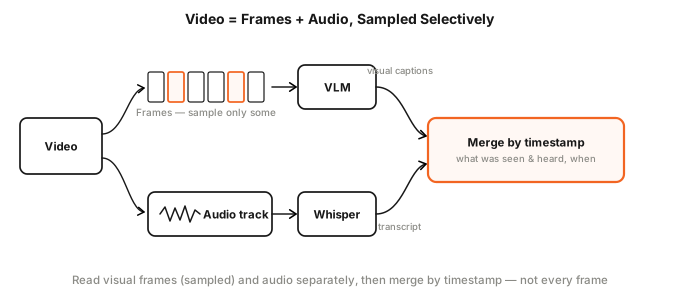
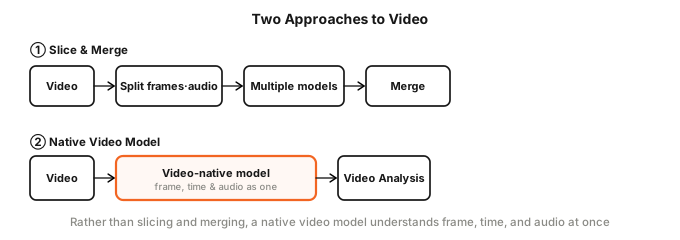
The split-and-merge approach is simple but has downsides. Sampling frames sparsely means missing the motion in between, and stitching the visual descriptions to the transcript afterward means the temporal flow isn’t always smooth. That’s why video-native models are an active research direction. Rather than viewing frames one by one, they train from the start on picture, time, and sound together — directly modeling the temporal relationships between frames.
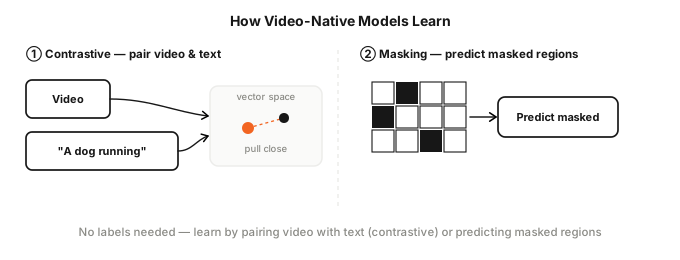
Video-native models learn from video alone, with no labels. One approach is contrastive learning — pulling video clips and their subtitles or captions close in the same vector space (the video version of CLIP). The other is masked prediction — masking part of the video and training the model to fill in the missing portion. Think of it as fill-in-the-blank with video: the model learns motion and temporal flow without any label sheet.
A video encoder trained this way can turn video into vectors, but it can’t generate text directly. So it uses the same input structure we already saw: the encoder’s video representation passes through a projector into an LLM, which then describes the video or answers questions about it.
Output
Generating text is familiar: the LLM picks the next token one at a time and chains them together. Images, audio, and video can’t be generated just by chaining tokens. Each modality has its own generation method.
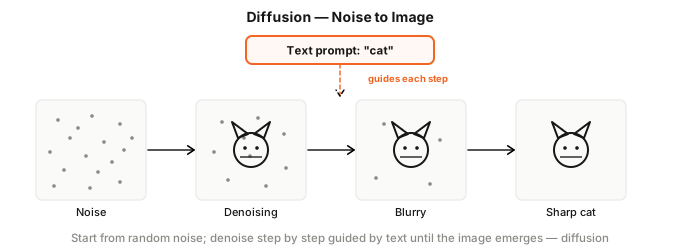
Images are made with a diffusion model — a different idea from an LLM chaining tokens. You start from random noise (a screen full of static) and repeatedly remove a little noise at a time, guided by the text “cat,” until after dozens of steps the blurry static resolves into a clear picture. Image generation tools like Midjourney and DALL·E work this way.
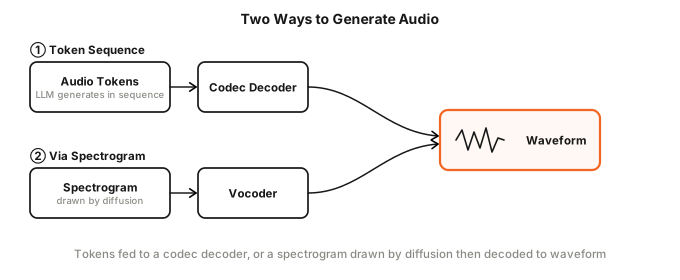
Audio is a waveform made of tens of thousands of numeric samples per second — too many to generate all at once. Two approaches exist. One is to compress the sound into a small number of audio tokens with a neural codec, generate tokens like an LLM would, then decode back into a waveform (used by music generator Suno and voice synthesis tool ElevenLabs). The other is to draw the spectrogram via diffusion and then convert it back to sound using a vocoder — a model that turns a spectrogram (a frequency picture) into an actual audio waveform you can hear.
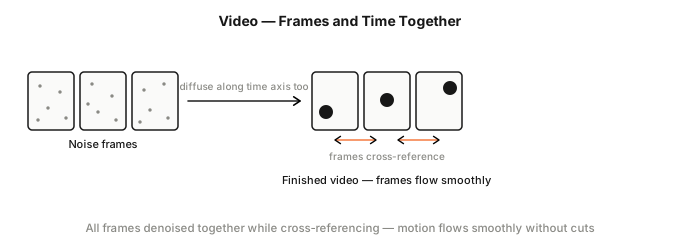
Video is the hardest on the output side too. Generating a single frame is the same as image generation, but maintaining temporal consistency across frames is the hard part. The dog in frame 1 must still be the same dog in frame 30, and the motion must not stutter or jump. So instead of generating frames one by one, you lay out multiple frames as a block and run diffusion across the horizontal, vertical, and time axes at once. Frames attend to each other to stay coherent. Sora and Runway work this way — and recently models have started generating matching audio alongside the video.
Hands-on
To make multimodal more concrete, let’s build an AI that takes a video as input and produces text output. The input is an MIT lecture. Feed it the lecture and it should answer questions like “when are functions explained?” with timestamps. The plan: convert the picture to text via a VLM, convert the audio via Whisper, merge them in chronological order into a timeline, then ask an LLM questions about it.
Setup. You’ll always need ffmpeg to split video into frames and audio. If OPENAI_API_KEY is set, the code prefers OpenAI for better quality; otherwise it falls back to local models.
- Picture description (VLM): OpenAI → gpt-4o, local → qwen2.5vl (or the lighter moondream).
- Speech transcription (Whisper): OpenAI → whisper-1, local → mlx-whisper.
- Answering (LLM): reads the timeline and answers questions. OpenAI → gpt-4o, local → Llama 3.2.
brew install ffmpeg
pip install openai mlx-whisper      # mlx-whisper is for the local backend

# (A) Using OpenAI — just provide the key
export OPENAI_API_KEY=sk-...

# (B) Using local — pull models via ollama
brew install ollama
ollama serve &                      # run ollama in the background
ollama pull qwen2.5vl               # VLM for picture descriptions
ollama pull llama3.2                # LLM for answering
The model client switches automatically based on whether OPENAI_API_KEY is set. The local Ollama server also exposes an OpenAI-compatible API, so a single OpenAI SDK handles both.
import os
from openai import OpenAI

if os.getenv("OPENAI_API_KEY"):
    client = OpenAI()                                                # OpenAI if available
    VLM_MODEL = TEXT_MODEL = "gpt-4o"
else:
    client = OpenAI(base_url="http://localhost:11434/v1", api_key="ollama")  # otherwise local Ollama
    VLM_MODEL, TEXT_MODEL = "qwen2.5vl", "llama3.2"
The key tool for video processing is a function that turns a single frame into text. It base64-encodes the frame image and sends it to the VLM. Video understanding ultimately comes down to running this function across multiple frames.
import base64

def describe_image(path, question="Describe what you see on this screen in one sentence."):
    b64 = base64.b64encode(open(path, "rb").read()).decode()
    resp = client.chat.completions.create(
        model=VLM_MODEL,
        messages=[{"role": "user", "content": [
            {"type": "text", "text": question},
            {"type": "image_url", "image_url": {"url": f"data:image/png;base64,{b64}"}},
        ]}],
    )
    return resp.choices[0].message.content.strip()
① Uniform-interval frame extraction. The simplest approach is to extract one frame every fixed interval. Let’s pull one frame every 10 seconds with ffmpeg and describe each with the function we just built.
import subprocess, glob, os

def extract_frames_every(video, interval, out="frames_basic"):
    os.makedirs(out, exist_ok=True)
    subprocess.run(["ffmpeg", "-y", "-i", video, "-vf", f"fps=1/{interval}",
                    f"{out}/f_%03d.png"], check=True, capture_output=True)
    return sorted(glob.glob(f"{out}/*.png"))

basic_frames = extract_frames_every("lecture.mp4", 10)   # one frame every 10 seconds
for i, f in enumerate(basic_frames):
    print(f"[{i*10}s]", describe_image(f))
In a lecture where the screen barely changes, you get the same “instructor standing at the board” description over and over, and ambiguous frames even produce hallucinations — inventing things like a professor’s name that’s nowhere on screen. Sampling at fixed intervals means watching the same scene multiple times.
② Extract only on scene changes (scene change detection). ffmpeg’s scene score — measuring how different a frame is from the one before it — lets you pick only the frames where the picture changes significantly. Slide transitions and cuts are captured; nearly identical frames are discarded. That cuts down both redundancy and hallucination. showinfo gives you each frame’s actual timestamp, and we extract the audio separately.
import re

def extract_scene_frames(video, threshold=0.3, out="frames"):
    os.makedirs(out, exist_ok=True)
    vf = f"select='eq(n\\,0)+gt(scene\\,{threshold})',showinfo"
    p = subprocess.run(["ffmpeg", "-i", video, "-vf", vf, "-vsync", "vfr",
                        f"{out}/frame_%03d.png"], capture_output=True, text=True)
    times = [float(t) for t in re.findall(r"pts_time:([0-9.]+)", p.stderr)]
    return list(zip(times, sorted(glob.glob(f"{out}/*.png"))))   # [(timestamp, path), ...]

def extract_audio(video, out="audio.m4a"):
    subprocess.run(["ffmpeg", "-y", "-i", video, "-vn", "-acodec", "aac", out],
                   check=True, capture_output=True)
    return out

scene_frames = extract_scene_frames("lecture.mp4")
audio = extract_audio("lecture.mp4")
③ Convert picture and sound to text. Each scene-change frame is described by the VLM (with its actual timestamp), and the audio is transcribed by Whisper with timestamps so we know which second each sentence came from. Transcription also switches backends — OpenAI whisper-1 or local mlx-whisper — and results are normalized to (timestamp, text) pairs.
frame_caps = [(t, describe_image(f)) for t, f in scene_frames]   # [(timestamp, description), ...]

if os.getenv("OPENAI_API_KEY"):
    def transcribe(path):
        with open(path, "rb") as f:
            r = client.audio.transcriptions.create(
                model="whisper-1", file=f,
                response_format="verbose_json", timestamp_granularities=["segment"])
        return [(s.start, s.text.strip()) for s in r.segments]
else:
    import mlx_whisper
    def transcribe(path):
        r = mlx_whisper.transcribe(path, path_or_hf_repo="mlx-community/whisper-large-v3-turbo")
        return [(s["start"], s["text"].strip()) for s in r["segments"]]

transcript = transcribe(audio)   # [(timestamp, text), ...]
④ Merge by timestamp and ask the LLM. Visual descriptions and transcripts are gathered as (timestamp, type, content) tuples, sorted, and joined into one timeline — one line per entry in the format "[m:ss] visual/transcript: content". Pass this timeline to the LLM with a question and it can answer with timestamps like “around 3:20.”
def mmss(t):
    m, s = divmod(int(t), 60)
    return f"{m}:{s:02d}"

events  = [(t, "visual", c) for t, c in frame_caps]
events += [(t, "transcript", x) for t, x in transcript]
events.sort(key=lambda e: e[0])
timeline = "\n".join(f"[{mmss(t)}] {kind}: {txt}" for t, kind, txt in events)

question = "List the concepts explained in the early part of this lecture, note roughly what timestamp each concept appears, and summarize the lecture in 2–3 sentences."
resp = client.chat.completions.create(
    model=TEXT_MODEL,
    messages=[{"role": "user",
               "content": f"Below is a chronological timeline of a lecture video.\n\n{timeline}\n\nQuestion: {question}"}],
)
print(resp.choices[0].message.content)
By anchoring both picture (slides, code) and speech to the same timestamps, nothing from either channel is missed, and the answer can include “around X:XX.”
The full runnable code — including image and audio input, generation (text→multimodal), and the omni direction — is in the GitHub repo (multimodal-practice).
Wrapping Up
I’ve traced how AI went from handling only text to seeing and hearing the world. It was a small exercise, and I knew roughly what the output would be — but watching a video become a neat text summary was still oddly satisfying.
When GPT first appeared, all it could do was chat in text. Since then it’s learned to generate Ghibli-style artwork, carry on voice conversations, and even produce short films. AGI and physical AI — AI that moves around in the real world — seem like they’re coming too, and I find myself genuinely curious about what that will look like.
This post may contain factual or interpretive errors. If you spot anything wrong or have a question, feel free to leave a comment.
Reference
- Attention Is All You Need (2017) — the Transformer paper
- An Image is Worth 16x16 Words (2020) — ViT paper
- Learning Transferable Visual Models From Natural Language Supervision (2021) — CLIP paper
- Denoising Diffusion Probabilistic Models (2020) — diffusion model foundations
- VideoPrism (2024) · V-JEPA 2 (2025) · TwelveLabs model overview — video-native models
- Hello GPT-4o (2024) — omni model announcement